MetaGPT
Remove Image Background
Overview
Image background removal is a technique used to separate the main objects from the background in an image. It finds applications in various fields such as image editing, person segmentation, product showcasing, and computer vision. By removing the background, it highlights the subject, enhances the visual appeal of the image, and provides a cleaner base for further processing and analysis.
Example
Task
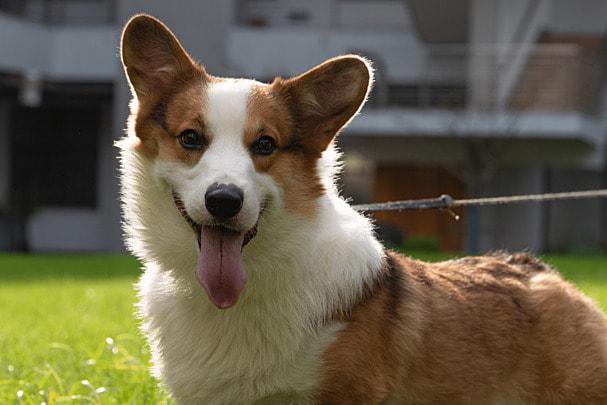
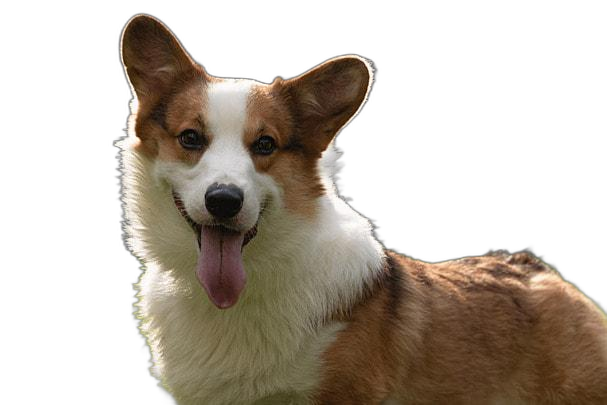
Use DataInterpreter to remove background from a picture of a dog.
Code
python examples/di/rm_image_background.pypython examples/di/rm_image_background.pyExecution Results
DataInterpreterproposes the following solution steps:
[
  {
    "task_id": "1",
    "dependent_task_ids": [],
    "instruction": "Install the rembg package using pip."
  },
  {
    "task_id": "2",
    "dependent_task_ids": ["1"],
    "instruction": "Use the rembg package to remove the background from the image at the specified path."
  },
  {
    "task_id": "3",
    "dependent_task_ids": ["2"],
    "instruction": "Save the image with the background removed to the specified save path."
  }
]
[
{
"task_id": "1",
"dependent_task_ids": [],
"instruction": "Install the rembg package using pip."
},
{
"task_id": "2",
"dependent_task_ids": ["1"],
"instruction": "Use the rembg package to remove the background from the image at the specified path."
},
{
"task_id": "3",
"dependent_task_ids": ["2"],
"instruction": "Save the image with the background removed to the specified save path."
}
]DataInterpreter is able to divide the problem into logical tasks, and here we can see that the first step is to install the Python library "rembg".
DataInterpreterwrites the following code:
# -----------------------------task1-------------------------------
!pip install rembg
# -----------------------------task2-------------------------------
from rembg import remove
input_path = '/data/luxiangtao/data_agents_opt-code_intepreter/dog.jpg'
output_path = '/data/luxiangtao/data_agents_opt-code_intepreter/dog_rmg.png'

# Read the input image
with open(input_path, 'rb') as i:
    input_image = i.read()

# Remove the background
output_image = remove(input_image)

# ------------------------------task3-------------------------------
# Write the output image
with open(output_path, 'wb') as o:
    o.write(output_image)
# -----------------------------task1-------------------------------
!pip install rembg
# -----------------------------task2-------------------------------
from rembg import remove
input_path = '/data/luxiangtao/data_agents_opt-code_intepreter/dog.jpg'
output_path = '/data/luxiangtao/data_agents_opt-code_intepreter/dog_rmg.png'
# Read the input image
with open(input_path, 'rb') as i:
input_image = i.read()
# Remove the background
output_image = remove(input_image)
# ------------------------------task3-------------------------------
# Write the output image
with open(output_path, 'wb') as o:
o.write(output_image)rembg is an open-source Python toolkit that enables automatic image background removal and can run on CPU. When we mention the use of this toolkit in the requirements, DataInterpreter is capable of automatically installing and correctly utilizing this toolkit.(This is likely because LLM learned the usage of the "rembg" Python library during its training)
Here is the input image of a dog and the image of the dog with the background removed. It can be seen that the background removal effect is excellent, and DataInterpreter can smoothly accomplish this problem.