
 MetaGPT
MultiAgent 101
We briefly discussed the creation of a single agent in last chapter. While a single agent may suffice for many situations, more complex tasks often demand collaboration and teamwork. This is where multiple agents become necessary. The core advantage of MetaGPT also lies in the easy and flexible development of a team of agents. Under MetaGPT framework, users can enable interactions between agents with a minimal amount of codes.
After this tutorial, you will be able to:
- Understand how agents interact with each other
- Develop your first team of agents
Run the software startup example
metagpt "write a cli flappy bird game"metagpt "write a cli flappy bird game"Develop your first team of agents
Hope you find the software startup example enlightenning. Perhaps now you're inspired to develop a team of agents tailored to your unique needs. In this section, we continue with the simple coding example in Agent101 but add more roles to introduce a very basic collaboration.
Together with the coder, let's also hire a tester and a reviewer. This starts to look like a development team, doesn't it? In general, we need three steps to set up the team and make it function:
- Define each role capable of intended actions
- Think about the Standard Operating Procedure (SOP), and ensure each role adhere to it. This is made possible by making each role observe the corresponding output from upstream, and publish its own for the downstream.
- Initialize all roles, create a team with an environment to put them in, and enable them to interact with each other
Complete code is available at the end of this tutorial
Define Action and Role
Following the same process as Agent101, we can define three Roles with their respective Actions:
- A
SimpleCoderwith aSimpleWriteCodeaction, taking instruction from the user and writing the main code - A
SimpleTesterwith aSimpleWriteTestaction, taking the main code fromSimpleWriteCodeoutput and providing a test suite for it - A
SimpleReviewerwith aSimpleWriteReviewaction, reviewing the test cases fromSimpleWriteTestoutput and check their coverage and quality
By giving the outline above, we actually make our SOP clear. We will talk about how to set up the Role according to it shortly.
Define Action
We list the three Actions.
from metagpt.actions import Action

class SimpleWriteCode(Action):
    PROMPT_TEMPLATE: str = """
    Write a python function that can {instruction}.
    Return ```python your_code_here ``` with NO other texts,
    your code:
    """
    name: str = "SimpleWriteCode"

    async def run(self, instruction: str):
        prompt = self.PROMPT_TEMPLATE.format(instruction=instruction)

        rsp = await self._aask(prompt)

        code_text = parse_code(rsp)

        return code_text
from metagpt.actions import Action
class SimpleWriteCode(Action):
PROMPT_TEMPLATE: str = """
Write a python function that can {instruction}.
Return ```python your_code_here ``` with NO other texts,
your code:
"""
name: str = "SimpleWriteCode"
async def run(self, instruction: str):
prompt = self.PROMPT_TEMPLATE.format(instruction=instruction)
rsp = await self._aask(prompt)
code_text = parse_code(rsp)
return code_textclass SimpleWriteTest(Action):
PROMPT_TEMPLATE: str = """
Context: {context}
Write {k} unit tests using pytest for the given function, assuming you have imported it.
Return ```python your_code_here ``` with NO other texts,
your code:
"""
name: str = "SimpleWriteTest"
async def run(self, context: str, k: int = 3):
prompt = self.PROMPT_TEMPLATE.format(context=context, k=k)
rsp = await self._aask(prompt)
code_text = parse_code(rsp)
return code_textclass SimpleWriteTest(Action):
PROMPT_TEMPLATE: str = """
Context: {context}
Write {k} unit tests using pytest for the given function, assuming you have imported it.
Return ```python your_code_here ``` with NO other texts,
your code:
"""
name: str = "SimpleWriteTest"
async def run(self, context: str, k: int = 3):
prompt = self.PROMPT_TEMPLATE.format(context=context, k=k)
rsp = await self._aask(prompt)
code_text = parse_code(rsp)
return code_textclass SimpleWriteReview(Action):
PROMPT_TEMPLATE: str = """
Context: {context}
Review the test cases and provide one critical comments:
"""
name: str = "SimpleWriteReview"
async def run(self, context: str):
prompt = self.PROMPT_TEMPLATE.format(context=context)
rsp = await self._aask(prompt)
return rspclass SimpleWriteReview(Action):
PROMPT_TEMPLATE: str = """
Context: {context}
Review the test cases and provide one critical comments:
"""
name: str = "SimpleWriteReview"
async def run(self, context: str):
prompt = self.PROMPT_TEMPLATE.format(context=context)
rsp = await self._aask(prompt)
return rspDefine Role
In many multi-agent scenarios, defining a Role can be as simple as 10 lines of codes. For SimpleCoder, we do two things:
- Equip the
Rolewith the appropriateActions withset_actions, this is identical to setting up a single agent - A multi-agent operation: we make the
Role_watchimportant upstream messages from users or other agents. Recall our SOP,SimpleCodertakes user instruction, which is aMessagecaused byUserRequirementin MetaGPT. Therefore, we addself._watch([UserRequirement]).
That's all users have to do. For those who are interested in the mechanism under the hood, see Mechanism Explained of this chapter.
class SimpleCoder(Role):
    name: str = "Alice"
    profile: str = "SimpleCoder"

    def __init__(self, **kwargs):
        super().__init__(**kwargs)
        self._watch([UserRequirement])
        self.set_actions([SimpleWriteCode])
class SimpleCoder(Role):
name: str = "Alice"
profile: str = "SimpleCoder"
def __init__(self, **kwargs):
super().__init__(**kwargs)
self._watch([UserRequirement])
self.set_actions([SimpleWriteCode])Similar to above, for SimpleTester, we:
- Equip the
SimpleTesterwithSimpleWriteTestaction usingset_actions - Make the
Role_watchimportant upstream messages from other agents. Recall our SOP,SimpleTestertakes main code fromSimpleCoder, which is aMessagecaused bySimpleWriteCode. Therefore, we addself._watch([SimpleWriteCode]).An extended question: Think about what it means if we use
self._watch([SimpleWriteCode, SimpleWriteReview])instead, feel free to try this too
Additionally, we want to show that you can define your own acting logic for the agent. This applies to situation where the Action takes more than one input, you want to modify the input, to use particular memories, or to make any other changes to reflect specific logic. Hence, we:
- Overwrite the
_actfunction, just like what we did in a single-agent setting in Agent101. Here, we wantSimpleTesterto use all memories as context for writing the test cases, and we want 5 test cases.
class SimpleTester(Role):
    name: str = "Bob"
    profile: str = "SimpleTester"

    def __init__(self, **kwargs):
        super().__init__(**kwargs)
        self.set_actions([SimpleWriteTest])
        self._watch([SimpleWriteCode])
        # self._watch([SimpleWriteCode, SimpleWriteReview])  # feel free to try this too

    async def _act(self) -> Message:
        logger.info(f"{self._setting}: to do {self.rc.todo}({self.rc.todo.name})")
        todo = self.rc.todo

        # context = self.get_memories(k=1)[0].content # use the most recent memory as context
        context = self.get_memories()  # use all memories as context

        code_text = await todo.run(context, k=5)  # specify arguments
        msg = Message(content=code_text, role=self.profile, cause_by=type(todo))

        return msg
class SimpleTester(Role):
name: str = "Bob"
profile: str = "SimpleTester"
def __init__(self, **kwargs):
super().__init__(**kwargs)
self.set_actions([SimpleWriteTest])
self._watch([SimpleWriteCode])
# self._watch([SimpleWriteCode, SimpleWriteReview]) # feel free to try this too
async def _act(self) -> Message:
logger.info(f"{self._setting}: to do {self.rc.todo}({self.rc.todo.name})")
todo = self.rc.todo
# context = self.get_memories(k=1)[0].content # use the most recent memory as context
context = self.get_memories() # use all memories as context
code_text = await todo.run(context, k=5) # specify arguments
msg = Message(content=code_text, role=self.profile, cause_by=type(todo))
return msgDefine SimpleReviewer following the same procedure:
class SimpleReviewer(Role):
    name: str = "Charlie"
    profile: str = "SimpleReviewer"

    def __init__(self, **kwargs):
        super().__init__(**kwargs)
        self.set_actions([SimpleWriteReview])
        self._watch([SimpleWriteTest])
class SimpleReviewer(Role):
name: str = "Charlie"
profile: str = "SimpleReviewer"
def __init__(self, **kwargs):
super().__init__(**kwargs)
self.set_actions([SimpleWriteReview])
self._watch([SimpleWriteTest])Create a team and add roles
Now that we have defined our three Roles, it's time to put them together. We initialize all of them, set up a Team, and hire them.
Run the Team, we should see the collaboration between them!
import asyncio
import typer
from metagpt.logs import logger
from metagpt.team import Team
app = typer.Typer()

@app.command()
def main(
    idea: str = typer.Argument(..., help="write a function that calculates the product of a list"),
    investment: float = typer.Option(default=3.0, help="Dollar amount to invest in the AI company."),
    n_round: int = typer.Option(default=5, help="Number of rounds for the simulation."),
):
    logger.info(idea)

    team = Team()
    team.hire(
        [
            SimpleCoder(),
            SimpleTester(),
            SimpleReviewer(),
        ]
    )

    team.invest(investment=investment)
    team.run_project(idea)
    asyncio.run(team.run(n_round=n_round))

if __name__ == '__main__':
    app()
import asyncio
import typer
from metagpt.logs import logger
from metagpt.team import Team
app = typer.Typer()
@app.command()
def main(
idea: str = typer.Argument(..., help="write a function that calculates the product of a list"),
investment: float = typer.Option(default=3.0, help="Dollar amount to invest in the AI company."),
n_round: int = typer.Option(default=5, help="Number of rounds for the simulation."),
):
logger.info(idea)
team = Team()
team.hire(
[
SimpleCoder(),
SimpleTester(),
SimpleReviewer(),
]
)
team.invest(investment=investment)
team.run_project(idea)
asyncio.run(team.run(n_round=n_round))
if __name__ == '__main__':
app()Complete script of this tutorial
https://github.com/geekan/MetaGPT/blob/main/examples/build_customized_multi_agents.py
Run it with
python3 examples/build_customized_multi_agents.py --idea "write a function that calculates the product of a list"python3 examples/build_customized_multi_agents.py --idea "write a function that calculates the product of a list"Or try it on Colab

Mechanism Explained
While users can write a few lines of code to set up a running Role, it's beneficial to describe the inner mechanism so that users understands the implication of the setup code and have a whole picture of the framework.
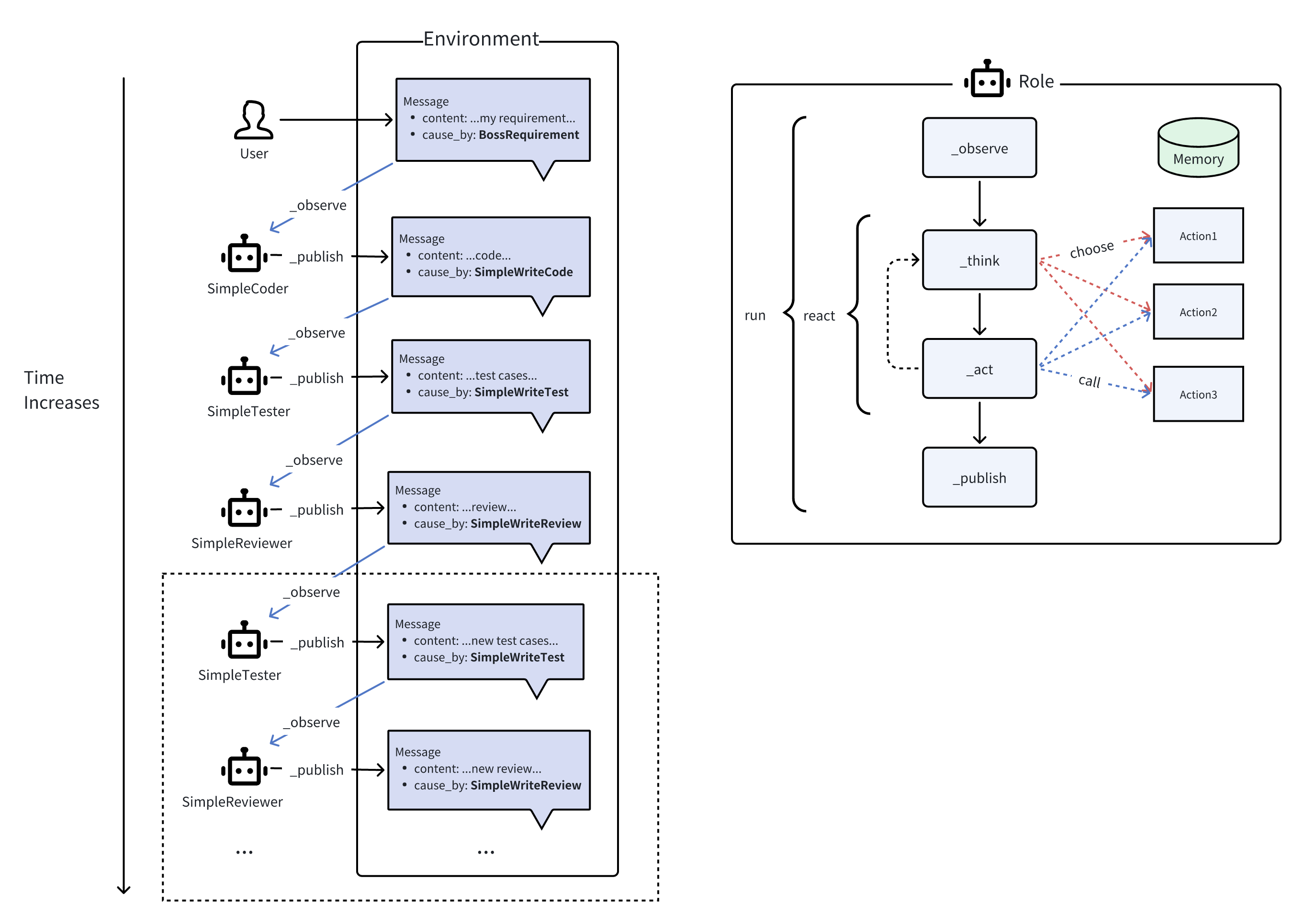
Internally, as shown in the right part of the diagram, the Role will _observe Message from the Environment. If there is a Message caused by the particular Actions the Role _watch, then it is a valid observation, triggering the Role's subsequent thoughts and actions. In _think, the Role will choose one of its capable Actions and set it as todo. During _act, Role executes the todo, i.e., runs the Action and obtains the output. The output is encapsulated in a Message to be finally publish_message to the Environment, finishing a complete agent run.
In each step, either _observe, _think, or _act, the Role will interact with its Memory, through adding or retrieval. Moreover, MetaGPT provides different modes of the react process. For these parts, please see Use Memories and Think and act
When each Role is set up appropriately, we may see the corresponding SOP to the example earlier in this tutorial, demonstrated by the left half of the diagram. The dotted box suggests the SOP can be extended if we make SimpleTester _watch both SimpleWriteCode and SimpleWriteReview.
We encourage developers with interest to see the code of Role, as we believe it is quite readable. Checking out run, _observe, react, _think, _act, publish_message should provide one with a decent understanding.